

how to use E99 / C99 screen-controller drone can be confusing when current-stock facts sit beside advertised or supplier-reference claims. This guide gives you a careful safe setup and use, exact live-product details and practical questions to resolve before use or purchase.
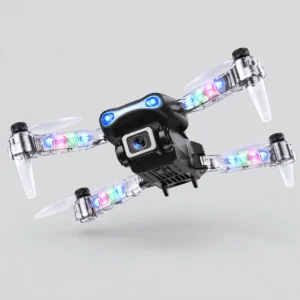
Why how to use E99 / C99 screen-controller drone matters
This article uses the live WooCommerce record as its commercial source. It does not invent speed, range, motor type, current-stock bundle, dimensions or other missing details. The exact product is E99 / C99 screen-controller drone, SKU ONIT-RC003, currently listed at KSh 6,500.00.
You can also browse the Remote Control Toys Kenya shop, read returns and refunds information, and compare the published JS27 drone buyer’s guide or S158 GPS drone buyer’s guide.
how to use E99 / C99 screen-controller drone verified product snapshot
| Catalog field | Current value |
|---|---|
| Product | E99 / C99 screen-controller drone |
| SKU | ONIT-RC003 |
| Current listed price | KSh 6,500.00 |
| Stock status | instock |
| product | E99 / C99 screen-controller drone |
| product category | RC drone |
| toy brand | Not stated |
| controller | Remote with built-in screen |
| camera | HD advertised; stock sensor resolution Not stated |
| lighting | LED lights |
| age marking | 12+ — original packaging |
| scale | Not stated |
| motor power | Not stated |
| control frequency | Not stated |
| battery | Rechargeable; capacity and voltage Not stated |
| speed | Not stated |
| runtime | Not stated |
| control range | Not stated |
| colour observations | Black/dark body observed; multicolour lights |
| included accessories | Not stated |
| supplier reference qualification | The illuminated transparent arms and E99 packaging match this product family. The account caption also says C99. Exact electronics and the included bundle remain unconfirmed for current stock; the following describe the cited E99/E99D version. |
| supplier reference radio channels | 2.4 GHz / 4 channels [Supplier version; see reference qualification.] |
| supplier reference stabilisation | 6-axis gyro, optical flow and altitude hold [Supplier version; see reference qualification.] |
| supplier reference motor | 716 brushed coreless [Supplier version; see reference qualification.] |
| supplier reference flight battery | 3.7 V 1800 mAh Li-Po [Supplier version; see reference qualification.] |
| supplier reference rated flight time | 8–10 minutes [Supplier version; see reference qualification.] |
| supplier reference charging | USB, 60–80 minutes [Supplier version; see reference qualification.] |
| supplier reference rated control image range | 100 m control; 50–70 m FPV [Supplier version; see reference qualification.] |
| supplier reference camera | 480p; manually adjustable through 90 degrees [Supplier version; see reference qualification.] |
| supplier reference controller | Non-touch LCD screen; Mode 2 left throttle; built-in 3.7 V 500 mAh battery [Supplier version; see reference qualification.] |
| supplier reference dimensions | Folded 13 × 7 × 5.5 cm; open 25 × 25 × 5.5 cm [Supplier version; see reference qualification.] |
| supplier reference weight | Approximately 120 g [Supplier version; see reference qualification.] |
| supplier reference functions | LED arms, headless mode, one-key takeoff/landing, Wi-Fi app, gesture photos and 360-degree rolls [Supplier version; see reference qualification.] |
| supplier reference supplier bundle | Drone, screen transmitter, battery, USB cable, 2 spare blades, 4 guards, screwdriver, manual and bag; current-stock quantities Not stated [Supplier version; see reference qualification.] |
The table preserves wording such as advertised, observed, supplier version and not stated. These labels protect the difference between current catalog evidence and a specification that could vary with model revision or package.
how to use E99 / C99 screen-controller drone step-by-step framework
Write your goal, compare it with the verified table, list unresolved questions, confirm the exact unit and plan a short supervised first session. Repeat the same process whenever the listing or stock revision changes.
In plain language, fit improves when verified product details satisfy more important needs.
Choose a clear practice area
how to use E99 / C99 screen-controller drone at this stage supports a careful safe setup and use. Choose a clear, open practice area away from people, roads, animals and property. Follow applicable local rules and use responsible adult supervision. The current catalog record supports these points: product: E99 / C99 screen-controller drone; product category: RC drone; controller: Remote with built-in screen; lighting: LED lights; age marking: 12+ — original packaging; colour observations: Black/dark body observed; multicolour lights; supplier reference qualification: The illuminated transparent arms and E99 packaging match this product family. The account caption also says C99. Exact electronics and the included bundle remain unconfirmed for current stock; the following describe the cited E99/E99D version.. Keep every qualification attached because some details describe observations, advertising, packaging or a cited supplier version rather than guaranteed current stock.
Make the first session simple. Learn one control at a time, keep the drone close and low, and stop whenever response becomes uncertain. Use the exact E99 / C99 screen-controller drone listing during this step. Confirm the model revision, controller, charging method and complete bundle whenever they affect your decision. This evidence-first routine makes how to use E99 / C99 screen-controller drone clearer and prevents unstated details from becoming accidental claims.
Safety checkpoint: Pause whenever the condition, instructions or control response differs from expectations. Responsible supervision and a clear area remain essential for how to use E99 / C99 screen-controller drone.
Check the exact package
how to use E99 / C99 screen-controller drone at this stage supports a careful safe setup and use. Read the instructions supplied with the exact unit. Online demonstrations may show another revision and should not replace the package manual. The current catalog record supports these points: product: E99 / C99 screen-controller drone; product category: RC drone; controller: Remote with built-in screen; lighting: LED lights; age marking: 12+ — original packaging; colour observations: Black/dark body observed; multicolour lights; supplier reference qualification: The illuminated transparent arms and E99 packaging match this product family. The account caption also says C99. Exact electronics and the included bundle remain unconfirmed for current stock; the following describe the cited E99/E99D version.. Keep every qualification attached because some details describe observations, advertising, packaging or a cited supplier version rather than guaranteed current stock.
Keep direct visual attention on the aircraft. A built-in screen or phone display is an aid and should not replace awareness of the surroundings. Use the exact E99 / C99 screen-controller drone listing during this step. Confirm the model revision, controller, charging method and complete bundle whenever they affect your decision. This evidence-first routine makes how to use E99 / C99 screen-controller drone clearer and prevents unstated details from becoming accidental claims.
Safety checkpoint: Pause whenever the condition, instructions or control response differs from expectations. Responsible supervision and a clear area remain essential for how to use E99 / C99 screen-controller drone.
how to use E99 / C99 screen-controller drone: Unfold without forcing parts
how to use E99 / C99 screen-controller drone at this stage supports a careful safe setup and use. Make the first session simple. Learn one control at a time, keep the drone close and low, and stop whenever response becomes uncertain. The current catalog record supports these points: product: E99 / C99 screen-controller drone; product category: RC drone; controller: Remote with built-in screen; lighting: LED lights; age marking: 12+ — original packaging; colour observations: Black/dark body observed; multicolour lights; supplier reference qualification: The illuminated transparent arms and E99 packaging match this product family. The account caption also says C99. Exact electronics and the included bundle remain unconfirmed for current stock; the following describe the cited E99/E99D version.. Keep every qualification attached because some details describe observations, advertising, packaging or a cited supplier version rather than guaranteed current stock.
Plan to land before any advertised limit. Conditions, battery state and revision differences can change usable session time. Use the exact E99 / C99 screen-controller drone listing during this step. Confirm the model revision, controller, charging method and complete bundle whenever they affect your decision. This evidence-first routine makes how to use E99 / C99 screen-controller drone clearer and prevents unstated details from becoming accidental claims.
Safety checkpoint: Pause whenever the condition, instructions or control response differs from expectations. Responsible supervision and a clear area remain essential for how to use E99 / C99 screen-controller drone.
Inspect before power-up
how to use E99 / C99 screen-controller drone at this stage supports a careful safe setup and use. Keep direct visual attention on the aircraft. A built-in screen or phone display is an aid and should not replace awareness of the surroundings. The current catalog record supports these points: product: E99 / C99 screen-controller drone; product category: RC drone; controller: Remote with built-in screen; lighting: LED lights; age marking: 12+ — original packaging; colour observations: Black/dark body observed; multicolour lights; supplier reference qualification: The illuminated transparent arms and E99 packaging match this product family. The account caption also says C99. Exact electronics and the included bundle remain unconfirmed for current stock; the following describe the cited E99/E99D version.. Keep every qualification attached because some details describe observations, advertising, packaging or a cited supplier version rather than guaranteed current stock.
Use camera features respectfully. Get consent before recording people or private spaces and never let the display distract from safe control. Use the exact E99 / C99 screen-controller drone listing during this step. Confirm the model revision, controller, charging method and complete bundle whenever they affect your decision. This evidence-first routine makes how to use E99 / C99 screen-controller drone clearer and prevents unstated details from becoming accidental claims.
Safety checkpoint: Pause whenever the condition, instructions or control response differs from expectations. Responsible supervision and a clear area remain essential for how to use E99 / C99 screen-controller drone.
Follow supplied charging guidance
how to use E99 / C99 screen-controller drone at this stage supports a careful safe setup and use. Plan to land before any advertised limit. Conditions, battery state and revision differences can change usable session time. The current catalog record supports these points: product: E99 / C99 screen-controller drone; product category: RC drone; controller: Remote with built-in screen; lighting: LED lights; age marking: 12+ — original packaging; colour observations: Black/dark body observed; multicolour lights; supplier reference qualification: The illuminated transparent arms and E99 packaging match this product family. The account caption also says C99. Exact electronics and the included bundle remain unconfirmed for current stock; the following describe the cited E99/E99D version.. Keep every qualification attached because some details describe observations, advertising, packaging or a cited supplier version rather than guaranteed current stock.
Choose a clear, open practice area away from people, roads, animals and property. Follow applicable local rules and use responsible adult supervision. Use the exact E99 / C99 screen-controller drone listing during this step. Confirm the model revision, controller, charging method and complete bundle whenever they affect your decision. This evidence-first routine makes how to use E99 / C99 screen-controller drone clearer and prevents unstated details from becoming accidental claims.
Safety checkpoint: Pause whenever the condition, instructions or control response differs from expectations. Responsible supervision and a clear area remain essential for how to use E99 / C99 screen-controller drone.
Pair controls methodically
how to use E99 / C99 screen-controller drone at this stage supports a careful safe setup and use. Use camera features respectfully. Get consent before recording people or private spaces and never let the display distract from safe control. The current catalog record supports these points: product: E99 / C99 screen-controller drone; product category: RC drone; controller: Remote with built-in screen; lighting: LED lights; age marking: 12+ — original packaging; colour observations: Black/dark body observed; multicolour lights; supplier reference qualification: The illuminated transparent arms and E99 packaging match this product family. The account caption also says C99. Exact electronics and the included bundle remain unconfirmed for current stock; the following describe the cited E99/E99D version.. Keep every qualification attached because some details describe observations, advertising, packaging or a cited supplier version rather than guaranteed current stock.
Read the instructions supplied with the exact unit. Online demonstrations may show another revision and should not replace the package manual. Use the exact E99 / C99 screen-controller drone listing during this step. Confirm the model revision, controller, charging method and complete bundle whenever they affect your decision. This evidence-first routine makes how to use E99 / C99 screen-controller drone clearer and prevents unstated details from becoming accidental claims.
Safety checkpoint: Pause whenever the condition, instructions or control response differs from expectations. Responsible supervision and a clear area remain essential for how to use E99 / C99 screen-controller drone.
Practice close and low
how to use E99 / C99 screen-controller drone at this stage supports a careful safe setup and use. Choose a clear, open practice area away from people, roads, animals and property. Follow applicable local rules and use responsible adult supervision. The current catalog record supports these points: product: E99 / C99 screen-controller drone; product category: RC drone; controller: Remote with built-in screen; lighting: LED lights; age marking: 12+ — original packaging; colour observations: Black/dark body observed; multicolour lights; supplier reference qualification: The illuminated transparent arms and E99 packaging match this product family. The account caption also says C99. Exact electronics and the included bundle remain unconfirmed for current stock; the following describe the cited E99/E99D version.. Keep every qualification attached because some details describe observations, advertising, packaging or a cited supplier version rather than guaranteed current stock.
Make the first session simple. Learn one control at a time, keep the drone close and low, and stop whenever response becomes uncertain. Use the exact E99 / C99 screen-controller drone listing during this step. Confirm the model revision, controller, charging method and complete bundle whenever they affect your decision. This evidence-first routine makes how to use E99 / C99 screen-controller drone clearer and prevents unstated details from becoming accidental claims.
Safety checkpoint: Pause whenever the condition, instructions or control response differs from expectations. Responsible supervision and a clear area remain essential for how to use E99 / C99 screen-controller drone.
Use the screen responsibly
how to use E99 / C99 screen-controller drone at this stage supports a careful safe setup and use. Read the instructions supplied with the exact unit. Online demonstrations may show another revision and should not replace the package manual. The current catalog record supports these points: product: E99 / C99 screen-controller drone; product category: RC drone; controller: Remote with built-in screen; lighting: LED lights; age marking: 12+ — original packaging; colour observations: Black/dark body observed; multicolour lights; supplier reference qualification: The illuminated transparent arms and E99 packaging match this product family. The account caption also says C99. Exact electronics and the included bundle remain unconfirmed for current stock; the following describe the cited E99/E99D version.. Keep every qualification attached because some details describe observations, advertising, packaging or a cited supplier version rather than guaranteed current stock.
Keep direct visual attention on the aircraft. A built-in screen or phone display is an aid and should not replace awareness of the surroundings. Use the exact E99 / C99 screen-controller drone listing during this step. Confirm the model revision, controller, charging method and complete bundle whenever they affect your decision. This evidence-first routine makes how to use E99 / C99 screen-controller drone clearer and prevents unstated details from becoming accidental claims.
Safety checkpoint: Pause whenever the condition, instructions or control response differs from expectations. Responsible supervision and a clear area remain essential for how to use E99 / C99 screen-controller drone.
Respect privacy
how to use E99 / C99 screen-controller drone at this stage supports a careful safe setup and use. Make the first session simple. Learn one control at a time, keep the drone close and low, and stop whenever response becomes uncertain. The current catalog record supports these points: product: E99 / C99 screen-controller drone; product category: RC drone; controller: Remote with built-in screen; lighting: LED lights; age marking: 12+ — original packaging; colour observations: Black/dark body observed; multicolour lights; supplier reference qualification: The illuminated transparent arms and E99 packaging match this product family. The account caption also says C99. Exact electronics and the included bundle remain unconfirmed for current stock; the following describe the cited E99/E99D version.. Keep every qualification attached because some details describe observations, advertising, packaging or a cited supplier version rather than guaranteed current stock.
Plan to land before any advertised limit. Conditions, battery state and revision differences can change usable session time. Use the exact E99 / C99 screen-controller drone listing during this step. Confirm the model revision, controller, charging method and complete bundle whenever they affect your decision. This evidence-first routine makes how to use E99 / C99 screen-controller drone clearer and prevents unstated details from becoming accidental claims.
Safety checkpoint: Pause whenever the condition, instructions or control response differs from expectations. Responsible supervision and a clear area remain essential for how to use E99 / C99 screen-controller drone.
Land with a reserve
how to use E99 / C99 screen-controller drone at this stage supports a careful safe setup and use. Keep direct visual attention on the aircraft. A built-in screen or phone display is an aid and should not replace awareness of the surroundings. The current catalog record supports these points: product: E99 / C99 screen-controller drone; product category: RC drone; controller: Remote with built-in screen; lighting: LED lights; age marking: 12+ — original packaging; colour observations: Black/dark body observed; multicolour lights; supplier reference qualification: The illuminated transparent arms and E99 packaging match this product family. The account caption also says C99. Exact electronics and the included bundle remain unconfirmed for current stock; the following describe the cited E99/E99D version.. Keep every qualification attached because some details describe observations, advertising, packaging or a cited supplier version rather than guaranteed current stock.
Use camera features respectfully. Get consent before recording people or private spaces and never let the display distract from safe control. Use the exact E99 / C99 screen-controller drone listing during this step. Confirm the model revision, controller, charging method and complete bundle whenever they affect your decision. This evidence-first routine makes how to use E99 / C99 screen-controller drone clearer and prevents unstated details from becoming accidental claims.
Safety checkpoint: Pause whenever the condition, instructions or control response differs from expectations. Responsible supervision and a clear area remain essential for how to use E99 / C99 screen-controller drone.
Inspect after use
how to use E99 / C99 screen-controller drone at this stage supports a careful safe setup and use. Plan to land before any advertised limit. Conditions, battery state and revision differences can change usable session time. The current catalog record supports these points: product: E99 / C99 screen-controller drone; product category: RC drone; controller: Remote with built-in screen; lighting: LED lights; age marking: 12+ — original packaging; colour observations: Black/dark body observed; multicolour lights; supplier reference qualification: The illuminated transparent arms and E99 packaging match this product family. The account caption also says C99. Exact electronics and the included bundle remain unconfirmed for current stock; the following describe the cited E99/E99D version.. Keep every qualification attached because some details describe observations, advertising, packaging or a cited supplier version rather than guaranteed current stock.
Choose a clear, open practice area away from people, roads, animals and property. Follow applicable local rules and use responsible adult supervision. Use the exact E99 / C99 screen-controller drone listing during this step. Confirm the model revision, controller, charging method and complete bundle whenever they affect your decision. This evidence-first routine makes how to use E99 / C99 screen-controller drone clearer and prevents unstated details from becoming accidental claims.
Safety checkpoint: Pause whenever the condition, instructions or control response differs from expectations. Responsible supervision and a clear area remain essential for how to use E99 / C99 screen-controller drone.
Store the set safely
how to use E99 / C99 screen-controller drone at this stage supports a careful safe setup and use. Use camera features respectfully. Get consent before recording people or private spaces and never let the display distract from safe control. The current catalog record supports these points: product: E99 / C99 screen-controller drone; product category: RC drone; controller: Remote with built-in screen; lighting: LED lights; age marking: 12+ — original packaging; colour observations: Black/dark body observed; multicolour lights; supplier reference qualification: The illuminated transparent arms and E99 packaging match this product family. The account caption also says C99. Exact electronics and the included bundle remain unconfirmed for current stock; the following describe the cited E99/E99D version.. Keep every qualification attached because some details describe observations, advertising, packaging or a cited supplier version rather than guaranteed current stock.
Read the instructions supplied with the exact unit. Online demonstrations may show another revision and should not replace the package manual. Use the exact E99 / C99 screen-controller drone listing during this step. Confirm the model revision, controller, charging method and complete bundle whenever they affect your decision. This evidence-first routine makes how to use E99 / C99 screen-controller drone clearer and prevents unstated details from becoming accidental claims.
Safety checkpoint: Pause whenever the condition, instructions or control response differs from expectations. Responsible supervision and a clear area remain essential for how to use E99 / C99 screen-controller drone.
Choosing the right how to use E99 / C99 screen-controller drone approach
| Question | Reliable action | Avoid |
|---|---|---|
| Is the exact revision clear? | Compare the package and ask the seller. | Assuming related model names are identical. |
| Are accessories listed? | Confirm every essential included item. | Budgeting from an unstated bundle. |
| Are performance figures qualified? | Keep advertised and supplier-reference labels visible. | Presenting reference figures as guarantees. |
| Is the setting suitable? | Choose a clear area and responsible supervision. | Operating near crowds, roads or property. |
In plain language, land before an advertised limit instead of trying to use every claimed minute.
how to use E99 / C99 screen-controller drone planning graphic
Exact package 5/5
Safe practice area 4/5
Accessory planning 3/5
| Planning item | Illustrative priority |
|---|---|
| Exact package | 5/5 |
| Safe practice area | 4/5 |
| Accessory planning | 3/5 |
Advantages of careful how to use E99 / C99 screen-controller drone
- Current-stock facts stay separate from supplier-reference claims.
- Missing specifications become precise seller questions.
- The exact product, price, SKU and image remain easy to verify.
- Package age markings, supervision and safety are planned first.
- Value is judged from fit and evidence.
how to use E99 / C99 screen-controller drone price and value
| Cost item | Current information |
|---|---|
| E99 / C99 screen-controller drone | KSh 6,500.00 when checked |
| Extra battery | Price and current-stock compatibility not stated; confirm |
| Replacement propellers | Price and compatibility not stated; confirm |
| Other accessories | Current bundle and prices not stated; confirm |
Value depends on the exact supplied package, verified features, safe usability and support—not only the headline price. Recheck the live listing before ordering because stock and commercial details may change.
Responsible next steps
- Open the exact product page.
- Confirm the model revision and package.
- Follow the manual supplied with that unit.
- Inspect before powering on.
- Choose a clear area away from people, roads and property.
- Use responsible adult supervision.
- Keep the aircraft in sight and respect privacy.
- Stop if any component appears damaged or control is uncertain.
Applicable local rules and the instructions supplied with the exact product always take priority. Screen views, advertised functions and automated features do not replace direct attention or sound judgment.
how to use E99 / C99 screen-controller drone FAQs
What is the current price of E99 / C99 screen-controller drone?
The live listing showed KSh 6,500.00 when this guide was updated. Recheck the product page because price and availability can change.
Which exact product does this article cover?
It covers E99 / C99 screen-controller drone, SKU ONIT-RC003, using the exact Remote Control Toys Kenya product record linked in the article.
Are supplier-reference figures guaranteed for current stock?
No. Supplier-reference details describe a cited related version. Confirm the exact model revision and package before relying on them.
What should be confirmed before purchase?
Confirm the model label, included controller, battery, charger, guards, propellers, manual, case and any camera or app detail important to you.
How should the first session be handled?
Follow the supplied manual, inspect the unit, choose a clear area away from people and property, keep it in sight and use responsible adult supervision.
Where can I buy E99 / C99 screen-controller drone?
Use the exact product link in this guide to check the latest price, stock and verified information from Remote Control Toys Kenya.